 # Troubleshooting and Support
**Level: Standard** • Quick reference
Where to look when something does not work, how to report it, and what SOAP2 does not do (yet).
> **Videos:** [Getting help](https://www.youtube.com/watch?v=bkF4_i5beT4) (0:50) · [Message Log](https://www.youtube.com/watch?v=HAs5q5RusOg) (0:22) · [SMTP setup](https://www.youtube.com/watch?v=wioyDbKeD30) (0:25) · [IB connection](https://www.youtube.com/watch?v=ew7PEqnJWeg) (0:24) · [All videos](./videos.md.html)
---
## On this page
- [Message Log](#message-log-diagnostics)
- [Troubleshooting](#troubleshooting)
- [Providing feedback / bug reports](#providing-feedback--bug-reports)
- [What SOAP doesn't do (yet)](#what-soap-doesn39t-do-yet)
- [Glossary](#glossary)
- [Community](#community)
---
## Message Log (diagnostics)
The **Message Log** helps diagnose connection and data issues and captures important runtime messages.
- Icon: **notepad** on the top toolbar (left of the **Wheel** icon)
- Saved automatically to your SOAP data folder as `MessageLog.txt`
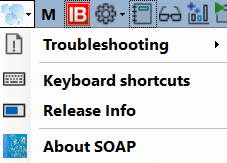
When reporting issues, include `MessageLog.txt` (and a screenshot if relevant). The Troubleshooting entry of the app's Help menu explains the reporting steps.
---
## Troubleshooting
- Cannot connect to TWS? Check the settings in [Connection prerequisites (TWS)](./getting_started.md.html#connection-prerequisites-tws).
- Use the **Message Log** and attach the `MessageLog.txt` file from the SOAP data folder.
- Severe crashes may also occasionally produce `CrashReport.txt` in the same data folder.
# Troubleshooting and Support
**Level: Standard** • Quick reference
Where to look when something does not work, how to report it, and what SOAP2 does not do (yet).
> **Videos:** [Getting help](https://www.youtube.com/watch?v=bkF4_i5beT4) (0:50) · [Message Log](https://www.youtube.com/watch?v=HAs5q5RusOg) (0:22) · [SMTP setup](https://www.youtube.com/watch?v=wioyDbKeD30) (0:25) · [IB connection](https://www.youtube.com/watch?v=ew7PEqnJWeg) (0:24) · [All videos](./videos.md.html)
---
## On this page
- [Message Log](#message-log-diagnostics)
- [Troubleshooting](#troubleshooting)
- [Providing feedback / bug reports](#providing-feedback--bug-reports)
- [What SOAP doesn't do (yet)](#what-soap-doesn39t-do-yet)
- [Glossary](#glossary)
- [Community](#community)
---
## Message Log (diagnostics)
The **Message Log** helps diagnose connection and data issues and captures important runtime messages.
- Icon: **notepad** on the top toolbar (left of the **Wheel** icon)
- Saved automatically to your SOAP data folder as `MessageLog.txt`
When reporting issues, include `MessageLog.txt` (and a screenshot if relevant). The Troubleshooting entry of the app's Help menu explains the reporting steps.
---
## Troubleshooting
- Cannot connect to TWS? Check the settings in [Connection prerequisites (TWS)](./getting_started.md.html#connection-prerequisites-tws).
- Use the **Message Log** and attach the `MessageLog.txt` file from the SOAP data folder.
- Severe crashes may also occasionally produce `CrashReport.txt` in the same data folder.
 The Message Log may contain sensitive information (e.g. account numbers, partial API keys). Review and redact before sharing.
The Crash Report, if any, is only written before closing, so it is not available from within SOAP.
[SMTP setup for GMail](./emailsetup.md.html)
---
## Providing feedback / bug reports
Please include:
- Screenshot (if UI-related)
- Short description and steps to reproduce
- `MessageLog.txt`
- `CrashReport.txt` (if present) and any relevant config files
You will need to enter your SMTP details in the Settings menu to send emails directly from SOAP2. Or send an email with the above details to:
[email protected]
---
## What SOAP doesn't do (yet)
- No concurrent loading of multiple trades on a single OA. You can open multiple OAs for the same symbol, but each OA is tied to a single trade.
- No automatic order transmission (prepared orders appear in the TWS API tab for manual review and transmission)
- No multi-currency support (USD only for now)
- No full futures/FX support yet (currently tested successfully for index futures)
- No mobile/tablet support (Windows desktop only)
- No **backtesting** or strategy optimization (yet)
- NO GUARANTEES: use at your own risk, and please provide feedback to help improve!
Planned features are listed in the [Release Notes](./ReleaseNotes.md.html).
---
## Glossary
- **SOAP2**: Simple Options Analysis Platform (v2)
- **OA**: Options Analysis window
- **SAT**: Symbol-Account-Trade (internal binding)
- **TWS**: Trader Workstation (Interactive Brokers)
- **IV**: Implied Volatility
- **HV**: Historical Volatility
- **HSkew**: Horizontal Skew (IV difference between strikes of different expiries)
- **VSkew**: Vertical Skew (IV difference between strikes of the same expiry)
---
## Community
- Slack: https://soap2-licensing.soap2-reg.workers.dev/join-slack
- Contact: `[email protected]`
- Support levels (community vs Premium priority support): see the [Licensing user guide](./licensing_user_guide.md.html)
The Message Log may contain sensitive information (e.g. account numbers, partial API keys). Review and redact before sharing.
The Crash Report, if any, is only written before closing, so it is not available from within SOAP.
[SMTP setup for GMail](./emailsetup.md.html)
---
## Providing feedback / bug reports
Please include:
- Screenshot (if UI-related)
- Short description and steps to reproduce
- `MessageLog.txt`
- `CrashReport.txt` (if present) and any relevant config files
You will need to enter your SMTP details in the Settings menu to send emails directly from SOAP2. Or send an email with the above details to:
[email protected]
---
## What SOAP doesn't do (yet)
- No concurrent loading of multiple trades on a single OA. You can open multiple OAs for the same symbol, but each OA is tied to a single trade.
- No automatic order transmission (prepared orders appear in the TWS API tab for manual review and transmission)
- No multi-currency support (USD only for now)
- No full futures/FX support yet (currently tested successfully for index futures)
- No mobile/tablet support (Windows desktop only)
- No **backtesting** or strategy optimization (yet)
- NO GUARANTEES: use at your own risk, and please provide feedback to help improve!
Planned features are listed in the [Release Notes](./ReleaseNotes.md.html).
---
## Glossary
- **SOAP2**: Simple Options Analysis Platform (v2)
- **OA**: Options Analysis window
- **SAT**: Symbol-Account-Trade (internal binding)
- **TWS**: Trader Workstation (Interactive Brokers)
- **IV**: Implied Volatility
- **HV**: Historical Volatility
- **HSkew**: Horizontal Skew (IV difference between strikes of different expiries)
- **VSkew**: Vertical Skew (IV difference between strikes of the same expiry)
---
## Community
- Slack: https://soap2-licensing.soap2-reg.workers.dev/join-slack
- Contact: `[email protected]`
- Support levels (community vs Premium priority support): see the [Licensing user guide](./licensing_user_guide.md.html)