# Symbol Settings Menu (under Settings & Windows, then Symbols, or press Alt-P)
A default watchlist is preloaded with adequate settings. New symbols will have limited default settings as well, however it is always recommended to edit them.
Settings are then saved so this is in most cases a once-off action.
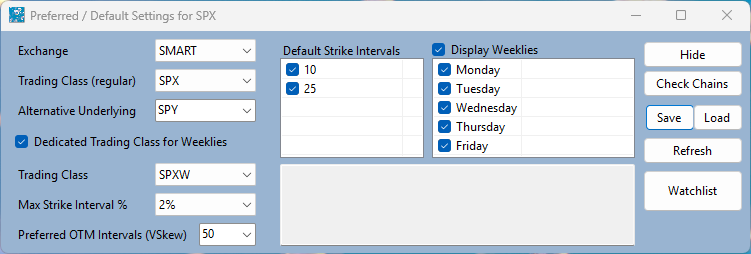
The "SMART" exchange is IB's standard routing facility for both data and orders. This will work for stocks and index options, but for futures or VIX, you will need to select the specific exchange (e.g. GLOBEX, CME, etc.) that the contract trades on.
The regular Trading Class is the one used for Monthly expirations. In most cases, in particular stocks, it is the same as the symbol.
Max Strike Intervals is the maximum gap between strikes on displayed options chains.
Weekly trading, and a selection of week expiration days is also set here.
**Alt Underlying** is used when the primary symbol is not itself tradable (e.g. an Index) and a substitute underlying should be used instead.
This field is a locked dropdown restricted to symbols already in your Watchlist — leave it as the symbol itself unless you specifically need a substitute.
The **OTM strike gap** (used in Vertical Skew calculations) is pre-filled from the symbol's own strike interval, so the default scales sensibly whether the underlying trades in small increments (e.g. VIX) or large ones (e.g. SPX). Adjust it via the dropdown if needed.
Go back to the main help page [SOAP2 Help Guide](index.md.html) or access help from the toolstrip.