# Handling expiries in SOAP
## Overview
For IB, an expiry is the last trading day for an options chain. It is generally the same day as its settlement, however not for a US index in its regular monthly class.
The expiry / trading class is therefore important. IB records options chains with the last trading day irrespective of the actual settlement, so the trading class is not always obvious.
In most cases, SOAP will automatically resolve the trading class for you, but there are cases where it cannot be resolved and manual selection is required.
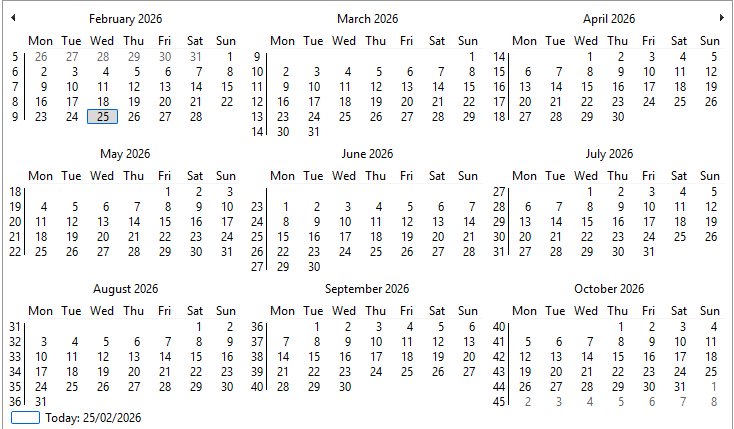
- **Expiry Selection**: The main Expiry Calendar displays the next 6 months, but it can be scrolled further.
- **Trading Class Selection**: In most cases, the trading class resolution will be automatic. There is otherwise a dropdown above the Calendar if need be
Selecting an expiry will populate the 4 data grids header below with chain candidates, initially showing Exp1 to Exp4.
When a new expiry is selected and it exists among the 4 candidates, the corresponding tab will be automatically selected.
If it does not exist among the 4 candidates, the first tab will be selected by default and the user can then select the desired expiry among the 4 candidates.
Scroll the calendar using the mouse wheel or the arrows on the top left and right. Click on a date to select it.
The selected date will be highlighted in blue and the corresponding options chain will be displayed in the data grids below when confirmed.
---
## Other selection modes
### Navigation through Expiry Tabs (above data grids)
- **4 preselected dates**: The first 4 available weeklies/monthlies are shown on separate tabs.
- **Individual tab settings**: Each tab can be set individually by clicking right and selecting another date.

Expiry Tabs show generic heading (Exp1 to Exp4) until an expiry is selected. Once an expiry is selected, the tab heading will update to show the actual expiry date.
The left arrow button next to the tabs allows you to reset the active tab to first leftmost position.
Note: available dates are filtered by the Weeklies flag in the Main Calendar (Press the W button above the main Calendar)
If weeklies are not selected, only monthly expiries will be available for selection in the tabs.
Expiry on individual tabs can be set by right-clicking on the tab and selecting another expiry from the dropdown menu.
The dropdown menu will show the next 6 available expiries for the trading class of the selected tab.
Note: An expiry must first be selected in the Main Calendar for the tabs to be populated.
Note: Regular monthly expiries are displayed in bold on the Calendar. It corresponds to the last trading day for the chain (IB convention).
If a monthly class is selected, the other 3 expiry tabs will automatically switch to the same trading class, but with the next 3 available expiries.
Therefore, if a weekly class is selected, the other 3 expiry tabs will switch to the next 3 available weeklies.
### Manual Trading Class Selection
- Switch between monthly (`M`), weekly (`W`), AM settlement (`A`), PM settlement (`P`) classes if unresolved by SOAP (seldom).
### Panel Controls (**Expand/Collapse**)
- `Alt-Down`: Expand top panel (strike interval selection + extra information).
- `Alt-Up`: Hide top panel.
Note: Ctrl-M toggles the minimum strike interval, which is enabled by default for short dated trading (0DTE or 1DTE). When enabled, the minimum strike interval is applied to the displayed strikes in the data grids below.
This allows you to focus on the most relevant strikes for short dated trading.

The Top Panel provides quick access to strike interval controls and trading class selection, allowing you to customize the displayed strikes and expiries without navigating away from the main options chain view.
Strike interval is then applied immediately to the displayed strikes in the data grids below. Go to [Symbol Settings](./symbolsettings.md.html) for permanent strike intervals.
In this instance, considering SPX is not a tradable symbol, the OA assumes SPX is the de facto underlying for mixed combos.
More than one Strike Interval can be combined.
### Strike Interval Controls
- Enable minimum strike interval with the `Ctrl-M` toggle.
- Minimum strike interval is selected by default for short dated trading (0DTE or 1DTE).
---
Go back to the main help page [SOAP2 Help Guide](index.md.html) or access help from the toolstrip.
Contact: [email protected]